Kubernetes · Chapter 3
Scheduling in Kubernetes
How Kubernetes decides which node each Pod runs on: labels, taints and tolerations, node affinity, resources, DaemonSets, Static Pods and custom schedulers.
When you create a Pod, someone has to decide which node it runs on. That someone is the kube-scheduler, which we met in the fundamentals chapter. In this chapter we will see how it makes that decision and all the ways we can influence it.
How the scheduler decides
The scheduler watches Pods that do not have a node assigned yet (their nodeName field is
empty). For each one it goes through these phases:
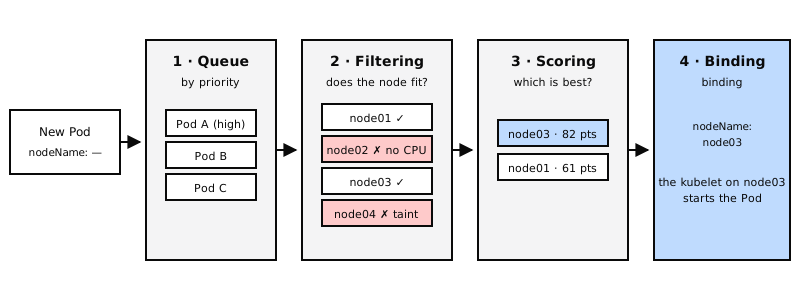
- Queue: pending Pods wait their turn, ordered by priority.
- Filtering: discards nodes that do not fit (not enough CPU or memory, a taint the Pod does not tolerate, not matching its affinity...).
- Scoring: ranks the remaining nodes, for example preferring the one with the most free resources or the one that already has the image.
- Binding: writes the chosen node into the Pod's
nodeNamefield. From then on, that node's kubelet starts it.
Manual scheduling with nodeName
You can bypass the scheduler by setting the node yourself in the Pod's spec:
apiVersion: v1
kind: Pod
metadata:
  name: nginx
spec:
  nodeName: node02
  containers:
    - name: nginx
      image: nginx
- It can only be set when the Pod is created. Afterwards,
nodeNamecannot be changed. - To assign an existing Pod you send a Binding object to the API (which is what the scheduler does internally).
- If there is no scheduler in the cluster, Pods without
nodeNamestay in thePendingstate.
Labels, selectors and annotations
They are the foundation of almost everything that follows:
- Labels: key-value pairs to group resources (
app: miapp,env: prod). - Selectors: the way to filter by those labels.
- Annotations: informational metadata that cannot be used for selection: version, contact, build details, etc.
kubectl get pods --selector app=miapp
kubectl get pods -l env=prod,tier=front-end
ReplicaSets, Deployments and Services use selectors to find their Pods. Note that what counts are
the labels of the Pod template (spec.template.metadata.labels), not those in the
ReplicaSet's own metadata.
metadata:
  name: miapp
  labels:
    app: miapp            # object labels, so others can find it
  annotations:
    buildversion: "1.34"  # information, not used for selection
Taints and tolerations
They make a node reject Pods, except the ones prepared for it:
- A taint goes on the node. By default, no Pod tolerates it.
- A toleration goes on the Pod and allows it to be scheduled on nodes with that taint.
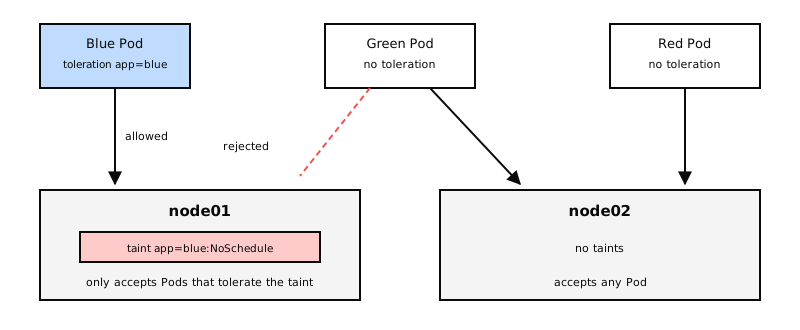
Important: a toleration does not force the Pod onto that node. It only gives it permission. The Pod may end up on any other node without taints. To steer it to a specific node you use affinity, which we will see shortly.
Step 1: taint the node
kubectl taint nodes node01 app=blue:NoSchedule

# Remove it (with a trailing dash)
kubectl taint nodes node01 app=blue:NoSchedule-
| Effect | What it does with Pods that do not tolerate it |
|---|---|
NoSchedule |
Does not schedule new Pods on the node. |
PreferNoSchedule |
Tries to avoid the node, but does not guarantee it. |
NoExecute |
Does not schedule new Pods and evicts the ones already there. |
Step 2: make the Pod tolerant
apiVersion: v1
kind: Pod
metadata:
  name: app-blue
spec:
  containers:
    - name: web
      image: nginx
  tolerations:
    - key: "app"
      operator: "Equal"
      value: "blue"
      effect: "NoSchedule"
That is why application Pods are not scheduled on the control plane: its nodes carry the taint
node-role.kubernetes.io/control-plane:NoSchedule.
nodeSelector: choosing nodes by label
The simplest way to steer a Pod to certain nodes. First you label the node, then you request it in the Pod:
kubectl label nodes node01 size=large
spec:
  nodeSelector:
    size: large
  containers:
    - name: procesador
      image: mi-procesador
Its limitation: it only supports equality. You cannot ask for "large or medium nodes" or "any node that is not small". That is what affinity is for.
Node affinity
Node affinity is the advanced version of nodeSelector: it supports operators (In, NotIn,
Exists, DoesNotExist, Gt, Lt) and required or preferred rules.
spec:
  affinity:
    nodeAffinity:
      requiredDuringSchedulingIgnoredDuringExecution:
        nodeSelectorTerms:
          - matchExpressions:
              - key: size
                operator: In
                values: ["large", "medium"]
  containers:
    - name: procesador
      image: mi-procesador
The long names describe the behavior at two moments:
| Type | When the Pod is scheduled | If the node changes later |
|---|---|---|
requiredDuringSchedulingIgnoredDuringExecution |
Required: if no node matches, the Pod stays Pending. |
Ignored: the Pod stays where it is. |
preferredDuringSchedulingIgnoredDuringExecution |
Preferred: if no node matches, it goes elsewhere. | Ignored. |
For "any node that is not small" you would use operator: NotIn with values: ["small"].
Taints and tolerations vs. affinity
They solve different problems and are usually used together:
- Taints and tolerations keep other Pods out of your nodes.
- Node affinity makes sure your Pods go to your nodes.
To reserve some nodes for an application: taint those nodes, add a toleration to the application's Pods and add affinity so those Pods do not land on other nodes.
Resource requests and limits
Each container can declare how much CPU and memory it needs and how much it may use at most:
spec:
  containers:
    - name: web
      image: nginx
      resources:
        requests:
          cpu: "250m"      # 0.25 cores
          memory: "256Mi"
        limits:
          cpu: "500m"
          memory: "512Mi"
- requests is what the scheduler uses: it only places the Pod on a node with that much free capacity.
- limits is the ceiling at runtime, and it behaves differently depending on the resource:
| Resource | If the container tries to exceed the limit |
|---|---|
| CPU | It is throttled: it runs slower, but stays alive. |
| Memory | The container is terminated with the OOMKilled error (out of memory). |
By default Kubernetes sets no requests or limits. A common practice: always set requests and, for CPU, be careful with limits, because they throttle even when the node has free CPU.
Two namespace objects set default values:
- LimitRange: default, minimum and maximum values per container.
- ResourceQuota: the total that the whole namespace can consume.
DaemonSets: one Pod on every node
A DaemonSet guarantees one copy of a Pod on every node in the cluster. When a node is added, it creates the Pod on it; when a node is removed, it deletes it.
It is used for agents that must run everywhere: monitoring, log collection or cluster networking (kube-proxy is deployed this way).
apiVersion: apps/v1
kind: DaemonSet
metadata:
  name: agente-monitoreo
spec:
  selector:
    matchLabels:
      app: agente-monitoreo
  template:
    metadata:
      labels:
        app: agente-monitoreo
    spec:
      containers:
        - name: agente
          image: agente-monitoreo
kubectl get daemonsets
kubectl describe daemonset agente-monitoreo
Since Kubernetes 1.12, DaemonSets use the regular scheduler together with node affinity rules to place each Pod.
Static Pods
The kubelet can work without the control plane: if you give it a folder with Pod YAML files, it creates them and keeps them alive on its own. These are Static Pods.
- The folder is configured in the kubelet (
staticPodPathin its configuration). It is usually/etc/kubernetes/manifests. - If you add a file, the kubelet creates the Pod; if you change it, it recreates it; if you delete it, the Pod disappears.
- If the node is part of a cluster, the kubelet publishes a read-only copy (mirror Pod) so it
shows up in
kubectl get pods, with the node name as a suffix. - This is how kubeadm starts the control plane itself: kube-apiserver, etcd, kube-scheduler and kube-controller-manager are Static Pods on the control plane nodes.
To see them on the node without going through the API: crictl ps.
| Static Pods | DaemonSets | |
|---|---|---|
| Who creates them | The kubelet, from local files | The control plane, through the API |
| Where | Only on the node with those files | On every node (or the ones you specify) |
| Typical use | Control plane components | Monitoring and logging agents |
| Ignored by the scheduler | Yes | No |
Multiple schedulers and profiles
Kubernetes supports custom schedulers that run alongside the default one. Each has a name, and each Pod chooses which one schedules it:
spec:
  schedulerName: mi-scheduler
  containers:
    - name: nginx
      image: nginx
An additional scheduler is deployed like any other Pod or Deployment, with its own configuration file:
apiVersion: kubescheduler.config.k8s.io/v1
kind: KubeSchedulerConfiguration
profiles:
  - schedulerName: mi-scheduler
To find out which scheduler placed each Pod:
kubectl get events -o wide
kubectl logs mi-scheduler -n kube-system
Plugins and extension points
The scheduler is built from plugins, each hooked into a phase (an extension point):
| Phase | Examples of built-in plugins |
|---|---|
queueSort |
PrioritySort (orders by priority) |
filter |
NodeResourcesFit, NodeName, NodeUnschedulable, TaintToleration, NodeAffinity |
score |
NodeResourcesFit, ImageLocality |
bind |
DefaultBinder |
There are also intermediate points (preFilter, postFilter, preScore, reserve, permit,
preBind, postBind) where you can add your own plugins.
Instead of maintaining several separate schedulers, a single kube-scheduler can have several
profiles, each with its own schedulerName and its own set of enabled or disabled plugins:
apiVersion: kubescheduler.config.k8s.io/v1
kind: KubeSchedulerConfiguration
profiles:
  - schedulerName: default-scheduler
  - schedulerName: sin-puntuacion
    plugins:
      score:
        disabled:
          - name: "*"
Key takeaways
- The scheduler filters nodes, scores them and binds the Pod by writing its
nodeName. nodeNameallows manual scheduling, only when the Pod is created.- Labels group, selectors filter and annotations only inform.
- Taints on nodes and tolerations on Pods: the node rejects whoever does not tolerate it.
NoExecutealso evicts. - nodeSelector steers Pods by label equality; node affinity adds operators and required or preferred rules.
- requests decide where a Pod fits; exceeding the CPU limit throttles, exceeding the memory one causes OOMKilled.
- DaemonSet: one Pod per node. Static Pod: created by the kubelet from local files.
- You can use several schedulers or profiles, chosen with
schedulerName.