Kubernetes · Chapter 1
Kubernetes Fundamentals
Containers, orchestration, the architecture of a cluster and how Kubernetes talks to runtimes through CRI and OCI.
Before talking about Pods, Deployments or Services, two ideas need to be clear: what a container is and why we need an orchestrator to run many of them. This note walks through those fundamentals and ends with a piece that often causes confusion: how Kubernetes talks to Docker, containerd and other runtimes.
It is the first note of my preparation for the CNCF KCNA (Kubernetes and Cloud Native Associate) certification.
The problem containers solve
A modern application is rarely a single program. It may include a web server, a database, a messaging system and an automation engine, each with its own libraries and versions. When it also has to run on the developer's laptop, in testing and in production, you end up with what is known as the "matrix from hell": a huge table of combinations of components, libraries and operating systems where any update can break something.
Containers solve this by packaging each component with all of its dependencies in an isolated environment. What works on the developer's machine works the same way in production, because exactly the same package is shipped.
Containers vs. virtual machines
An operating system has two layers: the kernel, which talks to the hardware, and the software on top (libraries, tools, package manager) that makes Ubuntu different from Fedora or Red Hat.
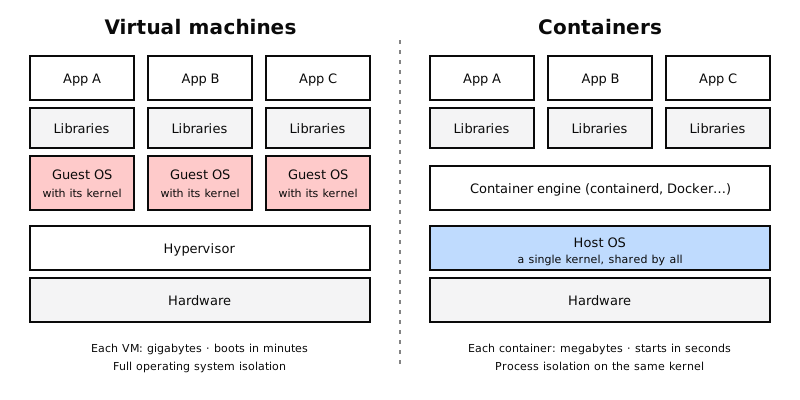
- A virtual machine virtualizes the hardware: each VM carries its own complete operating system, kernel included. It isolates a lot, but weighs gigabytes and takes minutes to boot.
- A container does not virtualize the operating system: it shares the host's kernel and only packages the application and its libraries. It weighs megabytes and starts in seconds.
Since every Linux distribution uses the same kernel, an Ubuntu host can run a container based on Fedora or Red Hat: the container brings its own user-space software and uses the host's kernel.
Watch out with Windows: a Windows container needs a Windows kernel. It cannot run directly on a Linux host, because they do not share a kernel.
Docker did not invent isolation: it relies on Linux kernel features (namespaces and cgroups) that technologies such as LXC were already using. Its contribution was making it easy to package, distribute and run containers.
Images and containers
Two concepts worth keeping apart:
- An image is the template: a read-only package with the application, its dependencies and the instructions to start it.
- A container is a running instance of that image. You can start many containers from the same image.
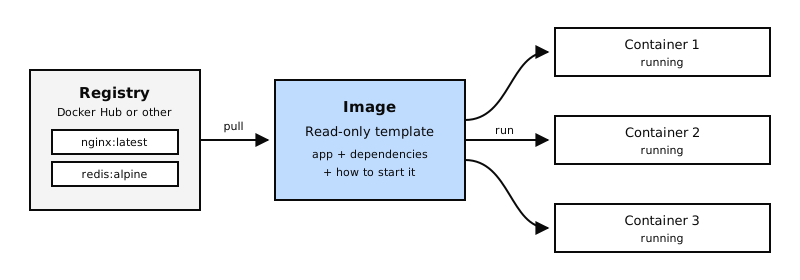
Images are stored in a registry. The best known is Docker Hub, which hosts official, ready-to-use images for databases, web servers and programming languages.
First Docker commands
On Ubuntu or Debian, Docker is installed from the repositories and a single command is enough to try it out:
# Install Docker (Ubuntu / Debian)
sudo apt-get update
sudo apt-get install -y docker.io

# Check that it works
sudo docker run hello-world

# Run a command inside an Alpine container and remove it when it finishes
sudo docker run --rm alpine echo "hello Tenci.io"

# Start services from official images
sudo docker run -d --name mi-base mongo
sudo docker run -d --name mi-web -p 8080:80 nginx
docker run downloads the image if it is not on the machine and creates a container from it.
Container orchestration
Running one container is easy. Running hundreds, spread across several servers, is not: what happens if a server goes down? How do I scale when traffic grows? How do containers find each other?
Orchestration is the automation of all of that across a group of machines (nodes):
- High availability: if a container or a node fails, it is recreated somewhere else.
- Scaling: adding or removing copies based on demand.
- Load balancing across the copies of an application.
- Declarative configuration: you describe in YAML files how you want the system to be, and the orchestrator takes care of reaching that state and keeping it.
There are several options (Docker Swarm was one of the simplest), but Kubernetes became the de facto standard. Setting it up is more demanding, in exchange for far more capabilities and the largest ecosystem in the cloud native world.
Kubernetes architecture
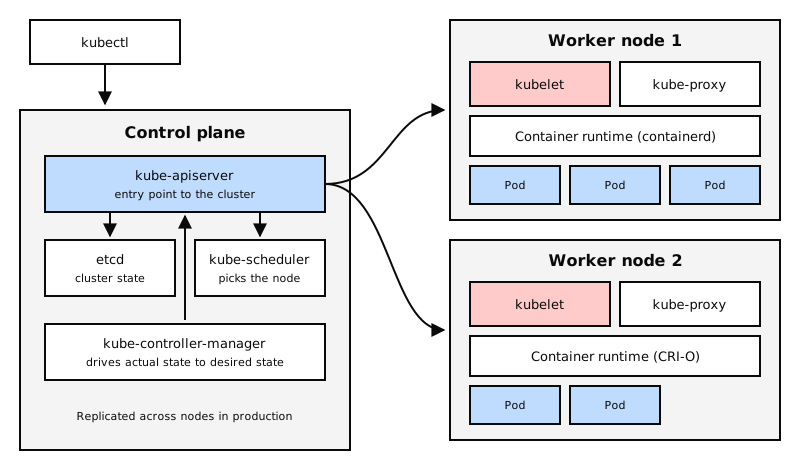
A Kubernetes cluster is a set of nodes with two different roles:
- The control plane (formerly called master): makes the cluster's decisions. In production it is replicated across several nodes to avoid a single point of failure.
- The worker nodes (once called "minions"): run the application containers.
Main components
| Component | Where it lives | What it does |
|---|---|---|
| kube-apiserver | Control plane | The entry point to the cluster. Users, tools and the other components always talk to it. |
| etcd | Control plane | Distributed key-value database that stores the whole cluster state. It keeps consistency across several control plane nodes. |
| kube-scheduler | Control plane | Decides which node runs each new container (Pod). It assigns, but does not run. |
| kube-controller-manager | Control plane | The controllers watch the actual state and act when it does not match the desired one: if a node or a container goes down, they react. They are the "brain" of orchestration. |
| kubelet | Every node | Agent that receives instructions from the control plane and makes sure the containers on its node are running as expected. |
| Container runtime | Every node | The software that actually runs the containers: containerd, CRI-O, etc. |
One more component you will see on every node is kube-proxy, which maintains the network rules that make services reachable.
kubectl: the Kubernetes command line
kubectl is the tool for managing the cluster: creating resources, querying them and checking
their status. Everything it does goes through the kube-apiserver.
# Cluster and node information
kubectl cluster-info
kubectl get nodes

# Create a Pod from an image
kubectl run hola-nginx --image=nginx

# List the running Pods
kubectl get pods
How Kubernetes talks to runtimes: CRI and OCI
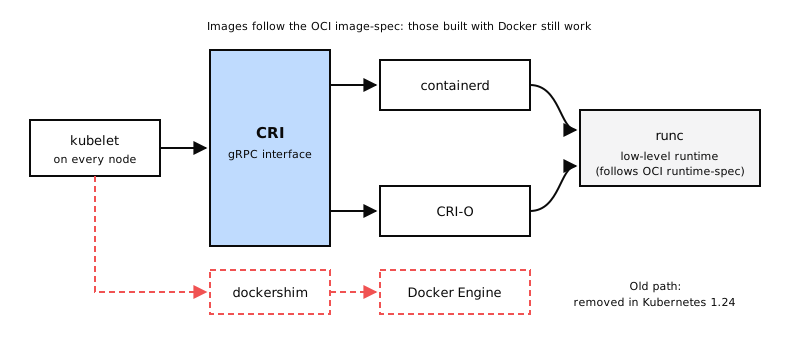
At first Kubernetes only knew how to work with Docker, with code written specifically for it. When other runtimes appeared, Kubernetes defined a common interface:
- CRI (Container Runtime Interface): the contract, based on gRPC, that the kubelet uses to talk to any runtime. If a runtime implements CRI, Kubernetes can use it: containerd, CRI-O and others.
- OCI (Open Container Initiative): the standard for the containers themselves. It has two parts:
- image-spec: how an image must be built.
- runtime-spec: how a runtime must behave when running it.
The end of dockershim
Docker predates CRI and never implemented it. To keep supporting it, Kubernetes maintained a translation layer called dockershim. It was a temporary solution and it was completely removed in Kubernetes 1.24.
Does that mean Docker images no longer work? No. Images built with Docker follow the OCI standard, so any compatible runtime (such as containerd) runs them unchanged. What went away was using the Docker engine as the cluster runtime.
Docker vs. containerd
Docker is not just a runtime: it is a set of tools (CLI, API, image building, volumes, authentication, security). Under the hood, Docker uses containerd to run containers.
containerd is an independent project and a CNCF graduated project. It can be installed on its own, without Docker, as the Kubernetes runtime: that is the usual setup today when the rest of Docker's tooling is not needed.
Command-line tools for runtimes
Without Docker on the node, there are three tools worth telling apart:
| Tool | Comes from | What it is for | Daily use? |
|---|---|---|---|
| ctr | containerd | Debugging containerd. Not user-friendly and limited. | No |
| nerdctl | containerd project | Docker-compatible CLI for containerd. | Yes, as a Docker replacement |
| crictl | Kubernetes | Inspecting and debugging any CRI-compatible runtime. | For troubleshooting nodes |
ctr
It ships with containerd. It is meant for testing and debugging, not for managing environments:
ctr images pull docker.io/library/redis:alpine
ctr run docker.io/library/redis:alpine redis
nerdctl
It offers an experience almost identical to Docker on top of containerd, supports Docker Compose and adds features Docker does not have, such as lazy pulling of images, encrypted images, P2P distribution and image signing and verification:
nerdctl run --name redis redis:alpine
nerdctl run --name web -p 8080:80 -d nginx:latest
crictl
It is maintained by the Kubernetes community and works with any CRI runtime. It is installed separately and its syntax resembles Docker. It is meant for inspecting and debugging, not for creating containers: if you create something with crictl outside the kubelet's control, the kubelet may delete it.
crictl pull busybox
crictl images
crictl pods
crictl ps -a
crictl logs <container-id>
crictl exec -it <container-id> ls
One difference from Docker: crictl understands Pods (crictl pods), because it speaks the
same language as the kubelet.
If the node has several runtimes, you tell it which one to use:
crictl --runtime-endpoint unix:///run/containerd/containerd.sock ps

# or permanently for the session
export CONTAINER_RUNTIME_ENDPOINT=unix:///run/containerd/containerd.sock
Key takeaways
- A container shares the host's kernel; a VM carries its own operating system.
- An image is the template; a container, a running instance.
- Orchestration automates availability, scaling, load balancing and declarative configuration. Kubernetes is the standard.
- A cluster has a control plane (kube-apiserver, etcd, kube-scheduler, kube-controller-manager) and worker nodes (kubelet, runtime, kube-proxy).
- The kubelet talks to runtimes through CRI; images follow the OCI standard.
- dockershim was removed in Kubernetes 1.24; Docker images still work.
- ctr to debug containerd, nerdctl as a Docker replacement, crictl to debug any CRI runtime.
In the next note: the basic Kubernetes resources, starting with Pods.