Linux · Chapter 1
Linux Essentials: The 010 Exam
What the LPI Linux Essentials certification assesses, how exam 010 is weighted and how to use the syllabus as a study map.
Linux Essentials is the entry-level certification from the Linux Professional Institute (LPI). It shows that you understand what Linux and free software are, that you can move around the command line comfortably and that you know the basics of a Linux system: files, users, permissions and networking.
This note is the starting point of the series: it summarizes the official syllabus of exam 010 so you can use it as a map. The following chapters cover each topic in depth.
Who it is for
- Anyone starting out with Linux, with no prior experience as an administrator.
- Students and professionals from other fields (networking, development, support) who want a solid foundation before more advanced certifications such as LPIC-1.
- Anyone who wants to demonstrate knowledge of free and open source software.
The exam at a glance
| Code | 010 (objectives version 1.6, code 010-160) |
| Format | 40 multiple-choice and fill-in-the-blank questions |
| Duration | 60 minutes |
| Score | Scale from 200 to 800; 500 to pass |
| Prerequisites | None |
Exam details may change between versions. Before booking it, check the current objectives on the official LPI website.
The five topics and their weight
Each objective in the syllabus has a weight that indicates roughly how many questions the exam devotes to it. Added up, the weights total 40, so you can read them almost as a number of questions.
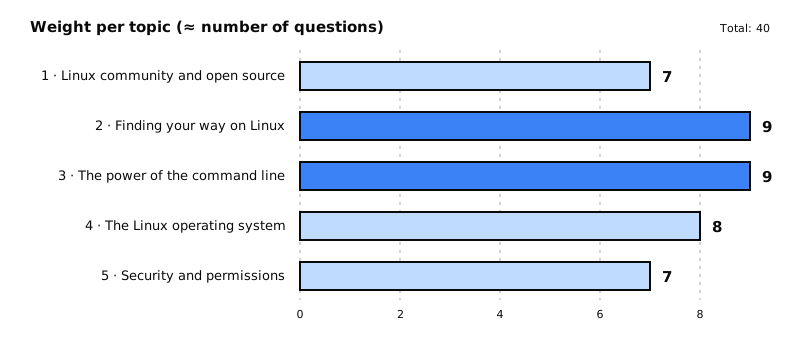
| Topic | What it covers | Weight |
|---|---|---|
| 1. The Linux community and a career in open source | History and distributions, free applications, licenses, basic desktop use and privacy | 7 |
| 2. Finding your way on a Linux system | Shell and command syntax, variables, help (man, info), directories and files |
9 |
| 3. The power of the command line | Archiving and compression, pipes and redirection, searching with grep, first scripts |
9 |
| 4. The Linux operating system | Choosing a system, hardware, where data is stored, processes, logs and networking | 8 |
| 5. Security and file permissions | User types, creating users and groups, permissions and ownership, links | 7 |
What you need to master in each topic
1. The Linux community and a career in open source
- The major distribution families (Debian/Ubuntu, Red Hat/Fedora, SUSE) and Linux in embedded systems (Android, Raspberry Pi) and in the cloud.
- Free desktop and server applications (LibreOffice, Firefox, GIMP, Apache, NGINX, MariaDB,
Samba...) and package managers (
apt,dpkg,rpm,yum). - The free software philosophy, copyleft and permissive licenses, the FSF and the OSI, and open source business models.
- Basic skills: browser, passwords, privacy and how to get to the terminal.
2. Finding your way on a Linux system
- Command syntax in Bash, variables, quoting,
echo,history,type,exportand thePATHvariable. - Getting help with
man,info,/usr/share/doc/andlocate. - Absolute and relative paths, hidden files,
ls,cd,.,..and~. - Creating, moving and deleting with
touch,cp,mv,rm,mkdir,rmdirand wildcards (globbing).
3. The power of the command line
- Archiving and compressing with
tar,gzip,bzip2,xz,zipandunzip. - Pipes (
|), redirection and basic regular expressions withgrep,less,head,tail,sort,cutandwc. - Turning repetitive commands into scripts: shebang, variables, arguments,
forloops and exit status. It is the most heavily weighted objective in the whole exam.
4. The Linux operating system
- Differences between Linux, Windows and macOS, and a distribution's life cycle.
- Hardware components, disks and partitions (
/dev/sd*) and drivers. - Where everything lives:
/etc,/var/log,/boot,/proc,/dev,/sys; processes withps,topandfree; logs withdmesgand syslog. - Networking:
ip addr,ip route,ss,ping,host,/etc/hostsand/etc/resolv.conf, IPv4 and IPv6.
5. Security and file permissions
- The root user, regular users and system users;
/etc/passwd,/etc/shadowand/etc/group;id,who,w,last,sudoandsu. - Creating users and groups with
useradd,groupaddandpasswd, and the role of/etc/skel. - Permissions and ownership with
ls -l,chmodandchown. - Temporary directories (
/tmp,/var/tmp), the sticky bit and symbolic links withln -s.
How to study for it
- Practice on a real or virtual machine. A distribution in VirtualBox, WSL or a cheap cloud server is enough. Typing the commands sticks better than reading them.
- Prioritize by weight. Topics 2 and 3 account for almost half of the exam.
- Learn to look for help. Knowing how to use
manand--helphelps you in the exam and in everyday work. - Review the terminology. Topic 1 has theory questions about licenses and the community.
In the next chapter: the Linux community, distributions and open source licenses.